Disaster Recovery in Ceph with cephadm, Ceph-CSI & RBD Mirror
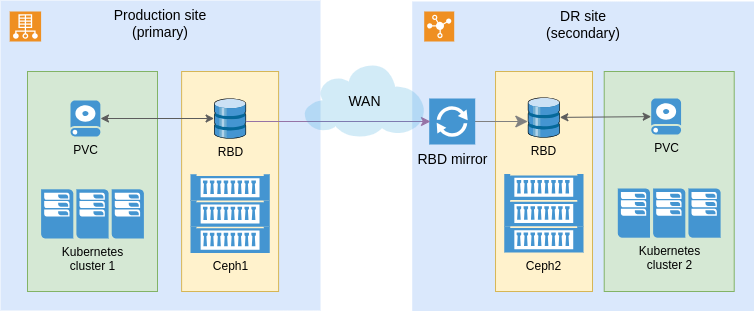
A practical guide to disaster recovery for Kubernetes workloads on Ceph — using cephadm for cluster management, Ceph-CSI for Kubernetes integration, and RBD Mirror for cross-datacenter replication.
Introduction
Ceph is a highly available, scalable, and resilient storage solution widely used in cloud and enterprise environments. Despite its built-in redundancy, a disaster recovery (DR) strategy remains essential for business continuity during data center failures, network outages, or hardware issues.
This guide explores implementing DR using three key technologies: cephadm for cluster management, Ceph-CSI for Kubernetes integration, and RBD Mirror for cross-datacenter replication.
Disaster Recovery Architecture
The setup involves two geographically separated locations:
- Primary data center (production) — contains the production Kubernetes and Ceph clusters.
- Secondary data center (disaster recovery) — hosts replica Kubernetes and Ceph clusters with asynchronous RBD mirroring.
Deploying Ceph with cephadm in Both Data Centers
Bootstrap the Ceph cluster and add the additional nodes:
# Bootstrap the cluster
cephadm bootstrap --mon-ip <mon-ip>

# Add additional nodes
cephadm shell -- ceph orch host add <hostname> <ip-address>
Deploy the required services, including the RBD mirror daemon:
ceph orch apply mon
ceph orch apply mgr
ceph orch apply osd --all-available-devices
ceph orch apply rbd-mirror

# Verify the rbd-mirror daemon status
ceph orch ps | grep rbd-mirror
Configure RBD Mirroring
On the primary cluster, enable snapshot-based mirroring on the pool:
rbd mirror pool enable <pool> snapshot
Export the mirror key and import it on the secondary cluster:
ceph auth get-key client.rbd-mirror > rbd-mirror.key
scp rbd-mirror.key <user>@<secondary-host>:
ssh <secondary-host> 'ceph auth import -i rbd-mirror.key'
On the secondary cluster, add the peer connection and verify the peering:
rbd mirror pool peer add <pool> client.rbd-mirror@<primary-cluster>

# Verify
rbd mirror pool status <pool>
Installing Ceph-CSI in Kubernetes Clusters
Deploy the Ceph-CSI driver in both Kubernetes clusters:
kubectl apply -f https://raw.githubusercontent.com/ceph/ceph-csi/devel/deploy/csi-rbdplugin.yaml
kubectl apply -f https://raw.githubusercontent.com/ceph/ceph-csi/devel/deploy/csi-rbdplugin-provisioner.yaml
Make sure mirroring is enabled on the pool, then define a StorageClass:
rbd mirror pool enable <pool> snapshot
apiVersion: storage.k8s.io/v1
kind: StorageClass
metadata:
  name: ceph-rbd-mirrored
provisioner: rbd.csi.ceph.com
parameters:
  clusterID: <cluster-id>
  pool: <pool-name>
  imageFormat: "2"
  imageFeatures: layering
  csi.storage.k8s.io/provisioner-secret-name: csi-rbd-secret
  csi.storage.k8s.io/provisioner-secret-namespace: default
  csi.storage.k8s.io/node-stage-secret-name: csi-rbd-secret
  csi.storage.k8s.io/node-stage-secret-namespace: default
reclaimPolicy: Delete
allowVolumeExpansion: true
Apply it, then create a PersistentVolumeClaim:
kubectl apply -f storageclass.yaml
apiVersion: v1
kind: PersistentVolumeClaim
metadata:
  name: ceph-rbd-pvc
spec:
  accessModes:
    - ReadWriteOnce
  resources:
    requests:
      storage: 10Gi
  storageClassName: ceph-rbd-mirrored
Failover — Switching to the Secondary Data Center
Promote the secondary Ceph cluster:
rbd mirror pool promote <pool>
Update the ClusterID and PoolID mappings so Ceph-CSI resolves volumes against the secondary cluster:
apiVersion: v1
kind: ConfigMap
metadata:
  name: ceph-csi-config
data:
  cluster-mapping.json: |-
    [
      {
        "clusterIDMapping": {
          "primary-cluster-id": "secondary-cluster-id"
        },
        "RBDPoolIDMapping": [
          { "1": "2" },
          { "11": "12" }
        ]
      }
    ]
kubectl apply -f ceph-csi-config.yaml
During failover, you must replace the primary monitor addresses with the IPs of the secondary cluster in ceph-csi-config — otherwise Ceph-CSI won't be able to use the volumes.
apiVersion: v1
kind: ConfigMap
metadata:
  name: ceph-csi-config
data:
  config.json: |-
    [
      {
        "clusterID": "ceph1",
        "rbd": { "radosNamespace": "" },
        "monitors": [ "192.168.39.82:6789" ],
        "cephFS": { "subvolumeGroup": "" }
      },
      {
        "clusterID": "ceph2",
        "rbd": { "radosNamespace": "" },
        "monitors": [ "192.168.39.82:6789" ],
        "cephFS": { "subvolumeGroup": "" }
      }
    ]
Point the StorageClass at the secondary cluster, apply it, and restart the affected workloads:
# StorageClass
parameters:
  clusterID: secondary-cluster-id
kubectl apply -f storageclass.yaml
kubectl rollout restart deployment <deployment-name>
Finally, validate that applications can access data on the secondary Ceph cluster.
Failback — Restoring to the Primary Data Center
Demote the secondary cluster and re-enable mirroring, then map ClusterID and PoolID back to the primary:
rbd mirror pool demote <pool>
Point the StorageClass back to the primary cluster and restart the workloads:
# StorageClass
parameters:
  clusterID: primary-cluster-id
kubectl rollout restart deployment <deployment-name>

# Verify mirroring and data integrity
rbd mirror pool status <pool>
Conclusion
By configuring ClusterID and PoolID mappings and ensuring the Ceph monitor addresses are updated during failover, you enable seamless disaster recovery for Kubernetes workloads using Ceph-CSI. The approach maintains data accessibility and consistency while making both failover and failback operations smoother.