ILMA · Module 2: Patching and upgrades
Patching you can measure. Compliance you can show.
Patching in ILMA starts from the inventory: which servers go together, in which window, and whether they may reboot. Playbooks do the work once a person approves, and every server ends up with one clear answer: compliant or not, and why.
What it answers
The four questions a head of operations, a patching team and an auditor ask. Each has one answer, read from the same data.
How many servers meet the patch rule, overall and by operating system, environment and team.
Which critical vulnerabilities have no patch yet, on which servers, and for how long.
Operating systems whose support ends within 90 days, or has already ended.
When each patch group is patched next, and how many servers it covers.
A server is compliant when it has no critical CVE without a patch and was patched within the agreed number of days.One rule, defined once. The dashboard, the report for the regulator and the conversation with the auditor all use the same one.
How a patch run works
From the inventory to the dashboard and back. A person decides, the machine does the work, and nobody has to update a spreadsheet afterwards.
Patch groups and windows
Which servers are patched together, in which window, and whether they may reboot. Written once, in the inventory.
Targets come from the group
Playbooks take their servers from the patch group, not from a list in a script. Critical CVEs set the order.
A person approves
The run goes to your ITSM as a change. Nothing starts until someone with the right to decide says yes.
The machine executes, in the window
Groups go in their order, inside their window. Servers that may not reboot wait for a window that allows it.
The state comes back
Monitoring reports what is really installed and running. Compliance updates by itself, with no spreadsheet in between.
Patch groups and windows
Every server belongs to a patch group, and every group has its window. Both are data in the inventory, so the dashboard and the automation always work with the same servers and the same nights.
Rules the groups keep
- Primary and standby of one database never share a patch group.
- Servers that may not reboot are marked, and wait for a window that allows it.
- System software, such as a database cluster, can have its own group apart from the servers it runs on.
- A new server found by discovery gets no window until someone places it in a group.
- Moving a server to another group is one change in the inventory, approved like any other.
An example week
Development first, test next, production last and in separate nights, with prod-C only once a month. Your groups and windows follow your change calendar.
What it looks like
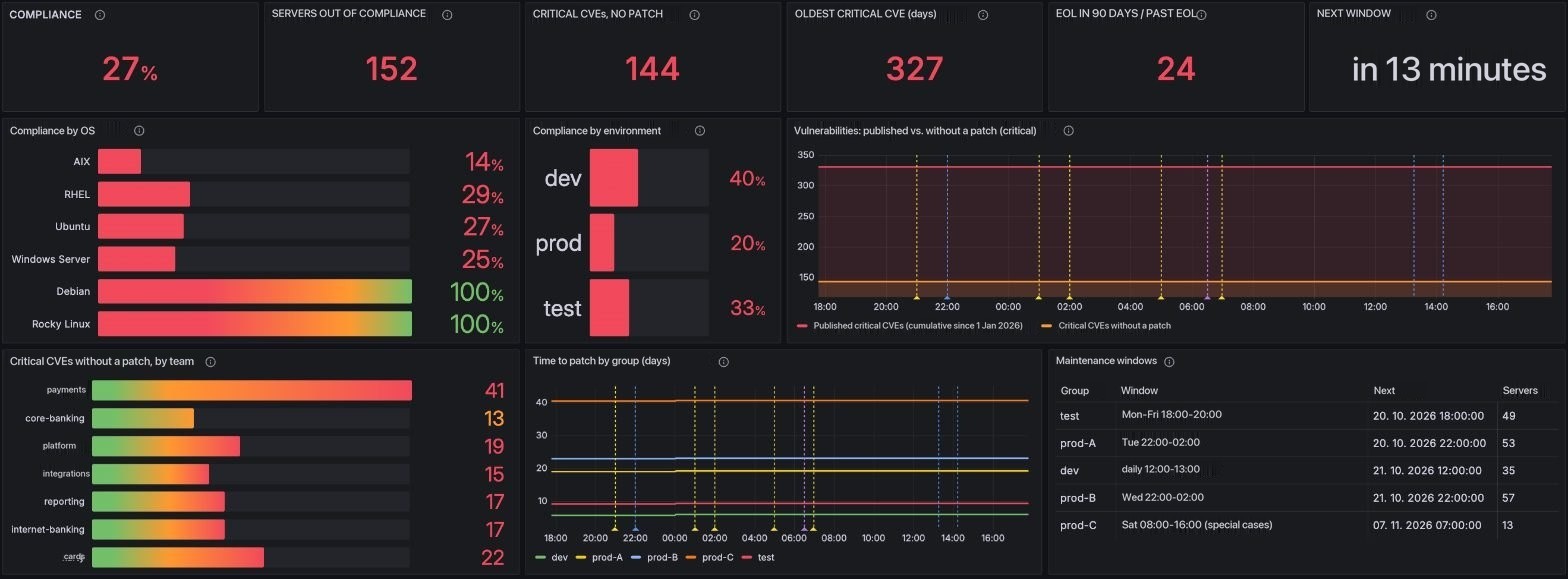
The patching dashboard, read top to bottom: the headline numbers, where they come from, who owns the risk and when the next window opens. The coloured frames and numbers are added for this page only.
 12345
- 1The headline numbersCompliance, servers out of compliance, critical CVEs without a patch, the oldest of them, end of life and the next window.
- 2By OS and environmentWhere the overall number comes from, and which part of the estate pulls it down.
- 3Critical vulnerabilitiesCritical CVEs published since the start of the year against those still without a patch.
- 4By team and patch groupWho owns the open risk, and how many days each group takes to patch.
- 5Maintenance windowsWhich group is patched when, the next start, and how many servers it covers.
From any server in the inventory, one click opens this dashboard filtered to that server.
Upgrades and the audit
Patching keeps the estate current. Two more things follow from the same data: the plan for systems that run out of support, and the evidence a regulator asks for.
Upgrades, not only patches
End of support is recorded for every operating system in the inventory. The list of servers whose support ends within 90 days is the upgrade plan, owner by owner.
What you get
- Servers past end of life, and those close to it
- The owner of each one, straight from the inventory
- Upgrades in the same groups, windows and approvals as patches
Evidence for the regulator
DORA asks how you manage ICT risk, and patching is where it shows first. The report is built from the data the dashboard uses, so it never needs a separate spreadsheet.
What the report shows
- Compliance over time, by environment and team
- Critical CVEs without a patch and how old they are
- Time to patch per group
- Every patch run with its result and its approval
Where it connects
The module is deployed on its own or together with the rest of ILMA. It needs to know what you run, and it works with the tools you already have.
The ILMA inventory
Patch groups, owners, environments and windows come from the operational source of truth. Nothing has to be entered twice.
Your own CMDB
If your CMDB is consolidated and up to date, the module connects to it. If it is not, we set up the minimal inventory patching needs as part of the module.
Monitoring, scanner, ITSM
What is installed and running comes from your monitoring, or from ILMA central monitoring if you run Module 3 as well. Your vulnerability scanner says which CVEs apply, and your ITSM carries the change and its approval.
See patch compliance on a live environment.
A live demo walks through the patching dashboard, the patch groups and windows in the inventory, and one server traced from its record to its compliance state. About an hour. No slides.